
Hospital Panic Buttons: A Complete Guide for Healthcare Safety Leaders
What a hospital panic button is, where to deploy it, which types fit clinicians, and how to roll one out staff actually trust.
A nurse in the ED is alone with a patient who’s already taken a swing at one staff member tonight. A nurse in a behavioral health unit is trying to de-escalate a crisis with no one else in the room. A tech clocking out at midnight is walking alone through a half-lit, empty parking garage, keys already in hand. Every one of these moments raises the same question: how do you call for help fast, without making the situation worse?
That’s the job of a hospital panic button, and the numbers behind it are worse than most people realize. Healthcare workers are five times more likely to experience workplace violence than workers in any other industry, according to OSHA. The American Hospital Association puts the total cost of that violence to U.S. hospitals at over $18 billion a year. A good chunk of that comes from nurses who leave after an incident: replacing a single bedside RN runs about $61,000, and hospitals lose millions a year to turnover tied directly to safety, not staffing. This isn’t only a safety problem. It’s a retention problem too.
Here’s the harder number. Only about one in eight incidents of workplace violence in healthcare ever gets formally reported. The rest gets absorbed as part of the job, and that’s not okay. When staff don’t have a convenient way to report what happened, hospitals lose the data they need to see the pattern, and staff learn that speaking up doesn’t change much. A panic button closes part of that gap, the one between a dangerous moment and a response that actually reaches someone in time. But it should also make it easier to report what happened after, not just call for help in the moment.
This guide covers what a hospital panic button is, where hospitals deploy them, which types work best for different roles, and how to roll one out so staff actually trust it.
What Is a Hospital Panic Button?
A hospital panic button is the trigger a staff member uses to request help immediately, often silently. Press it, and it sends a signal to whoever is set up to respond: security, a charge nurse, a monitoring center, or some combination of the three.
The button is really just the front door. What matters more is everything behind it: who gets notified, how fast, and what happens if nobody answers right away. That’s what separates a real nurse panic button or healthcare panic button from something that looks reassuring on paper but falls apart under stress.
Panic buttons come in a handful of forms. Some are fixed to a wall or a desk. Some live on a badge or a wearable. A growing number live on a phone staff already carry every shift.
It’s worth untangling three terms the industry uses loosely: panic alarm, panic button, and staff duress system. A panic alarm typically triggers something loud and visible: a siren, a flashing light, an overhead page. That’s useful for a large-scale emergency, but it’s the wrong tool for a quiet crisis. A panic button, on the other hand, is just the trigger itself, and it can feed into either a loud panic alarm or a silent, coordinated response. When hospitals talk about a full staff duress system, they mean everything the button connects to: the routing, the monitoring, the escalation if nobody answers. Think of the panic button as the doorbell and the duress system as everyone who shows up when it rings.
Where Hospitals Deploy Panic Buttons
Risk isn’t evenly spread across a hospital, so panic button placement should follow where incidents actually happen, not just tradition. The most common deployment areas include:
- Emergency departments, where volume, wait times, and unpredictable patients create friction every shift. ED staff often deal with the highest concentration of behavioral escalations in the building, simply because it’s the entry point for so many different kinds of crises.
- Behavioral health units, where staff regularly work in close contact with patients in crisis. A discreet trigger matters more here than almost anywhere else, since a visible or loud alert can escalate the exact situation it’s meant to defuse.
- Labor and delivery, where emotions run high and situations can turn fast. Family conflict, medical complications, and long, exhausting hours all raise the stakes for staff working these units.
- Pharmacy, often handling controlled substances and thinly staffed overnight. That combination makes pharmacy windows a common target, especially on night shifts with only one or two people on duty.
- Outpatient and ambulatory clinics, especially satellite locations without the security presence of a main campus. These sites are frequently smaller, quieter, and easier to overlook when safety budgets get allocated.
- Parking garages and structures, where staff walk alone to their cars, often after dark. Poor lighting and low foot traffic make these spaces a consistent concern for anyone working late or early shifts.
Notice that half of that list already sits outside the hospital’s four walls, and for a lot of health systems, it doesn’t stop there. Home health visits push staff even further out, into a driveway or a living room with no coworkers nearby and no fixed button anywhere in reach. A panic button that stops working the moment someone steps off campus isn’t protecting the whole shift. It’s only protecting part of it, which is why lone worker protection belongs in the same conversation.
Types of Panic Buttons
Fixed and under-desk buttons. Standard in registration desks, pharmacies, and nurse stations for years. They work well when staff are stationed in one place, but they don’t travel. A nurse who leaves the desk to walk a patient down the hall has left her panic button behind.
Badge-based panic buttons. Wearable badges give staff something portable, often with a discreet button they can press without drawing attention. The tradeoff: badges get left in lockers, forgotten at home, or run low on battery mid-shift. They’re also one more device to carry, on top of a building access badge and everything else a shift requires.
Wearable panic buttons. Similar to badges, but often built into a lanyard, clip, or watch. Tying the button to something staff already wear daily solves some of the “forgot it at home” problem, but it’s still separate hardware that can fail, lose charge, or drop out of range.
A lot of hospitals aren’t starting from zero here. Plenty have run a dedicated duress device for years, and the complaint isn’t usually that it fails. It’s that it’s one more thing: one more device to charge, one more device to issue and chase down when someone leaves, one more thing competing for space on a lanyard that already has a badge and an ID on it. That fatigue is a big reason more hospitals are moving toward something staff already have on them, instead of something new to manage.
App-based panic buttons. An app-based panic button lives on a device staff already carry: their phone, tablet, and increasingly, their Apple Watch. No new hardware to issue, charge, or replace. This is where the market is heading, especially as more health systems already put smartphones and tablets in clinicians’ hands for tools like Epic Rover™. It’s also a return on a device the hospital has already paid for. Instead of budgeting for new hardware, you’re getting more value out of equipment your staff are carrying anyway.
So which type works best for clinicians? In practice, it’s the one they’re not thinking about. A clinician mid-shift, holding a chart, prepping medication, or physically supporting a confused patient, doesn’t have a free hand to reach for a badge, let alone press it. A phone that’s already in their pocket for a dozen other reasons tends to win.
It’s also worth looking at how many ways a system lets someone actually ask for help. One button is still one point of failure. The strongest app-based options give staff more than a single trigger: an alert from inside the app, a phone’s side action button programmed as an SOS, a press from the lock screen, an Apple Watch, even a code word through Siri. None of that is about adding complexity. It’s about making sure there’s always a way to get help, whatever position someone’s hands are in when something goes wrong.
Many hospitals don’t pick just one. A common approach pairs fixed buttons at high-traffic desks with an app-based option for staff who move around the building, giving both a stationary safety net and a portable one. The goal isn’t finding a single perfect device. It’s making sure nobody ends up in a moment where the only panic button available is one they left somewhere else.
What Are the Best Mobile Panic Button Systems for Hospitals?
If you’re comparing mobile panic button systems, a few features separate the ones that hold up in a real emergency from the ones that just look good in a demo. It’s worth asking about each one by name, since most vendors won’t bring them up first.
Room-level location accuracy. A hospital is a maze of concrete, steel, and multiple floors, and generic location tech isn’t built for that kind of density. If a system can only tell you the building, not the room, you’re sending help to the right address and the wrong door. Look for systems built on Wi-Fi and RTLS technology, the kind that can actually resolve to a specific room.
Silent vs. audible activation. Some situations call for a loud alarm. Others don’t. A behavioral health de-escalation or a tense patient encounter can get worse fast if an alert draws attention to itself. What matters most isn’t picking one over the other, it’s having the choice. The strongest systems let each hospital, or even each unit, decide whether an alert stays silent or sounds an alarm, based on what actually happens on their floors.
Integration with existing security and nurse call. A panic button that doesn’t talk to anything else creates more work, not less. If security is watching one screen and nurse call is watching another, someone still has to notice the alert and connect the dots. The strongest systems plug straight into the security workflows and nurse call infrastructure hospitals already run, so one alert reaches the right people without anyone checking a second screen.
Professional monitoring vs. internal-only alerting. This comparison gets overlooked more than it should. Internal-only alerting routes a request straight to on-site staff or security. That works fine when someone’s watching closely. It works less well at 2 a.m. on a short-staffed weekend, when whoever would normally respond is already handling three other things. That gap gets even bigger at satellite and ambulatory sites, where there often isn’t on-site security to route an alert to in the first place, and some of these locations don’t run overnight at all. Internal-only alerting assumes someone is there to catch it. At a lot of these sites, nobody is. Professional monitoring adds a 24/7 team behind the alert, watching for it, verifying it, and dispatching help even when internal staff can’t respond immediately. For hospitals running lean overnight or spread across multiple sites, that layer often decides whether an alert gets seen or sits unanswered.
Taken together, these four features are a reasonable shorthand for the whole evaluation. A system can look impressive in a sales deck and still fail on any one of them, and it only takes one gap for an alert to go unanswered.
How Hospitals Deploy Panic Buttons for Security
Technology is rarely the hard part. Getting staff to trust it, use it without hesitation, and stick with it once the initial training wears off is where most rollouts succeed or stall. Rolling out a new panic button system hospital-wide on day one is a good way to end up with a system nobody trusts. Hospitals that see strong, lasting adoption tend to follow a similar path.
Start with a pilot unit. Pick one department, often the ED or behavioral health, and run the system there first. It’s a lot easier to fix problems and build internal champions with thirty people than with three thousand.
Train for the moment, not just the mechanics. Staff need more than a walkthrough of how to press a button. They need to understand what happens after: who gets notified, how fast, and what to expect if help doesn’t show up right away. That confidence is what keeps someone from hesitating in a real moment.
Test on a regular cadence. A panic button nobody has tested since installation is a panic button nobody trusts. A monthly testing schedule is common, confirming alerts still route correctly, especially after any change to staffing, floor layout, or IT infrastructure.
Plan for accidental activations. They will happen. A button gets bumped in a pocket. A badge gets pressed while being clipped on. Hospitals that stick with a system long-term build in a fast, simple way to confirm a false alarm without embarrassing the staff member or flooding the response team. This is also where professional monitoring earns its keep again: a team that verifies alerts all day can usually clear a false positive faster, and with less disruption, than an already-stretched internal team. Systems with high false-positive rates quietly train staff to ignore alerts, which defeats the entire point.
Expand once the pilot proves out. Once a unit shows strong adoption and a clean response process, that’s the green light to move toward a hospital-wide rollout. A successful pilot builds the internal champions and the proof points that make the rest of the rollout faster, not slower. The goal is protection everywhere, and a strong pilot is how you get there without a bumpy start.
The Payoff: Retention, Recruiting, and Trust
A panic button is easy to justify on safety grounds alone. But the return shows up in places a lot of leaders don’t expect.
- Retention. Staff who feel protected stay longer. We already saw what turnover costs: about $61,000 to replace a single bedside RN, and millions a year system-wide. A system that helps staff feel safe, and helps them report when something happens instead of absorbing it quietly, is one of the most direct ways to keep good people from walking out the door.
- Recruiting. Candidates comparing offers notice which hospitals actually invest in protecting their people. In a labor market where nurses and techs have options, a real safety program isn’t a footnote on a benefits sheet. It’s a differentiator.
- Trust. It’s also a signal to your current staff. Anyone can post a policy on a break room wall. Giving people an actual way to call for help, and knowing someone will answer, tells your team the hospital means it.
None of that shows up on a feature list, but it’s often the reason a safety investment gets approved in the first place.
Ready to Strengthen Staff Safety?
See how Becklar Staff Duress protects healthcare teams on the devices they already carry.
How Becklar Supports Hospital Staff Safety
Here’s where a lot of hospitals land after working through everything above: the best panic button often isn’t a separate button at all. It’s Staff Duress, and it lives on the device your staff already carry.
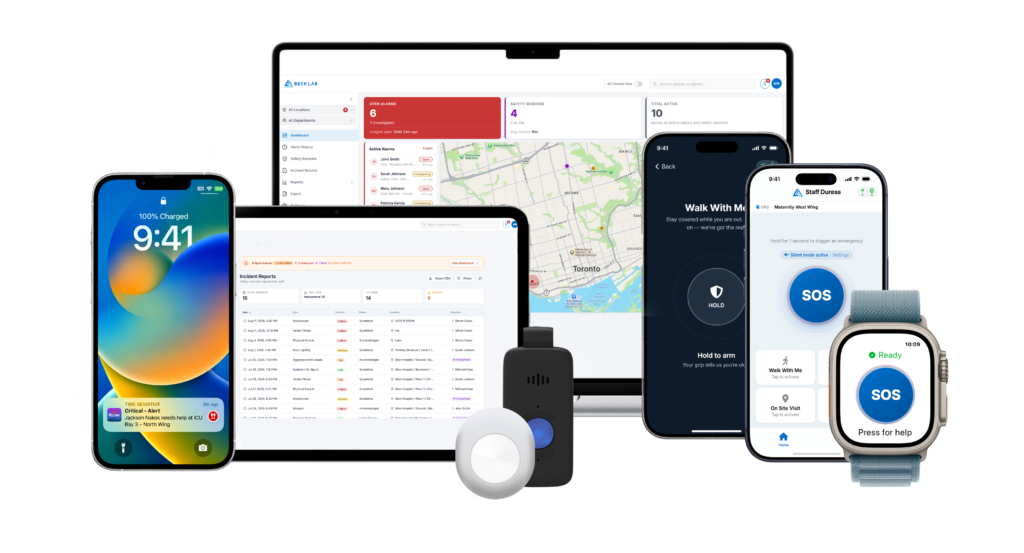
Becklar Workforce Safety’s Staff Duress solution turns the iPhone, iPad, or Apple Watch your clinicians already have into a complete duress system. No badges to issue, charge, or lose. No new hardware to train staff on. If your hospital already puts smartphones or tablets in staff hands for tools like Epic Rover™, Staff Duress works inside that same device instead of adding another one.
That integration goes deeper than convenience. Becklar is the first Epic Toolbox™ designated staff duress solution. Alerts route natively through Rover™, Haiku™, and Hyperspace™, using FHIR, the same data standard your EHR already runs on. For IT and security teams, that’s one less system to bolt on and one less thing staff have to learn. That’s a real operational difference, not a talking point.
Staff Duress gives your team eight ways to activate an alert, so safety never depends on one method working perfectly under stress. It identifies room-level location, not just a building or a floor. And it’s backed by 24/7 award-winning professional monitoring, so alerts get watched and acted on around the clock, not only during the shifts when someone happens to be free.
Becklar has also achieved SOC 2 compliance across its full product suite, which matters when the data involved is your staff’s location and safety information.
A real system also needs to do more than sound an alarm. Staff Duress goes beyond SOS:
- Walk With Me mode. Someone heading to their car late at night gets an active line open the whole way there, not just a button to press if something goes wrong.
- Check-in timers. Staff set an expected length for a visit, so if a behavioral health session that’s supposed to run twenty or thirty minutes goes long, someone already knows to check instead of finding out an hour later that something happened.
- Built-in incident reporting. A fast way to document what happened, which matters given how much workplace violence in healthcare never gets written down anywhere.
An SOS button matters. It’s just not the whole job.
Protection doesn’t stop at the hospital doors, either. Staff Duress extends to parking garages and structures, satellite and ambulatory clinics, and home health visits. Becklar is also finalizing a partnership with Homecare Homebase, extending that same protection into the home-based care workflows more of your workforce relies on every day. That also means you’re not stitching together one vendor for the hospital, another for satellite offices, and a third for home health. It’s one system, wherever your people go.
Panic buttons have come a long way from a button under a desk. The best ones today are barely buttons at all. They’re built into the tools your staff already trust, already carry, and already use every shift. That’s the whole point: protection that’s there the moment someone needs it, without asking anyone to remember one more thing. For nurses, techs, pharmacists, and everyone else your hospital is responsible for protecting, that’s not a small upgrade. It’s the difference between a safety plan on paper and one that works on a Tuesday night when nobody expected trouble.

Simon Crapo
Becklar Workforce Safety: Business Development Specialist
Simon works with hundreds of healthcare organizations across North America to help them elevate the safety of their workforce.